

Where the details come from: public catalogs, your own keys and how to turn them off
The app does not keep the details of books, films or games saved. When you add something, it looks them up for you on internet services. They are public databases, such as the catalog of the Spanish National Library.
This page explains which ones they are, what the app sends them and how to choose which ones to use. To see everything that leaves your device, see What leaves your device and what does not.
If you prefer not to use any of them, turn them all off. Everything can be added by hand.
Where it is changed
Section titled “Where it is changed”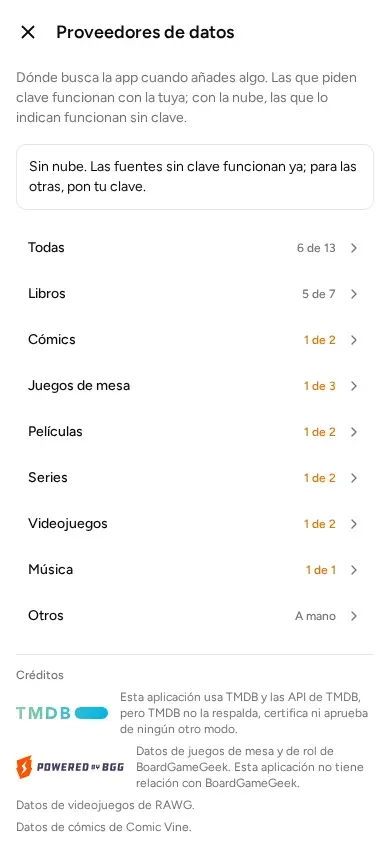
- Open the menu and go to “Settings”.
- Tap “Data providers”.
- On the left, choose “All” or a kind (books, comics, films…).
You will see the services used for that kind.
Each kind shows a number like “2 of 5”. It means that 2 of its 5 services can be used now. If there are few, the number shows in orange: the app will search in few places.
“Other” does not search anywhere: it is added by hand.
What each label means
Section titled “What each label means”Each service has a switch to turn it on or off. Below it there is a label that says what it needs:
- “No key needed”: it works already, with no action. They come switched on.
- “Needs a key”: it needs a key of yours. A key is like a password: the service’s website gives it to you for free, so you can use its data. Until you put it in, that service is not used.
- “Needs an account”: it only works if you have a Kosmotheka account. It is explained below.
- “Needs a key or an account”: a key of yours or an account is enough.
Which services there are for each kind
Section titled “Which services there are for each kind”| Kind | Service | What it is | What it needs |
|---|---|---|---|
| Book | Biblioteca Nacional de España, Library of Congress (the US national library), Open Library, Inventaire | Book catalogs | Nothing |
| Book | Wikidata | A free encyclopedia anyone can look things up in | Nothing |
| Book | Google Books | Google’s book search; the most complete one by ISBN | Your own key, or an account |
| Book | RPGGeek | A website of role-playing books; it only searches by title | An account |
| Comic | Wikidata | As above | Nothing |
| Comic | Comic Vine | A comics website | Your own key, or an account |
| Board game | Wikidata | As above | Nothing |
| Board game | GameUPC | Searches games by the box’s barcode | Your own key |
| Board game | BoardGameGeek | A board game website | An account |
| Film and TV series | Wikidata | As above | Nothing |
| Film and TV series | TMDB | A films and series website | Your own key, or an account |
| Video game | Wikidata | As above | Nothing |
| Video game | RAWG | A video game website | Your own key, or an account |
| Music | MusicBrainz | An open database of albums | Nothing |
The ISBN is the number next to the barcode of a book.
The covers are downloaded from the service that has them, and kept on your device.
Without a key or an account, comics, board games, films, series and video games are searched only on Wikidata. It works, but sometimes covers or editions are missing. That is why the app warns you.
Put in your own key
Section titled “Put in your own key”- In “Data providers”, open the service that asks for a key.
- Tap “How to get a key” and follow the steps on its website.
- Paste the key in “Paste your key here”.
- Tap “Save”.
- Tap “Test”. The app says “Key works.” or “This key was rejected.”.
TMDB has two keys. Paste the long one, the one called “API Read Access Token”. Do not paste the short key.
With your key in place, the app asks the service directly. The data does not pass through any Kosmotheka computer. The app says so: “Uses your own key: nothing goes through the server.”
To remove the key, tap “Remove the … key” with the name of the service (for example, “Remove the TMDB key”).
Turn a service off
Section titled “Turn a service off”Tap the service’s switch. It stops receiving questions and does not appear in the results.
If you had put a key in, it stays saved in case you turn the service on again.
What is sent to each service
Section titled “What is sent to each service”Only what you search for is sent. That is the title you type, or the barcode number (for example, the ISBN).
Your list of books, your name and what you have are not sent.
Like any website, each service sees from which internet connection you ask. It also sees that the question comes from Kosmotheka, and which version of the app is asking.
If you have an account: some go through the server
Section titled “If you have an account: some go through the server”With a Kosmotheka account, some services are queried through your account’s server. The server is the computer, on the internet, that keeps the libraries in the cloud. The cloud is keeping your libraries on the internet too, in your account. It is explained in The cloud.
The server searches with its own key. That is why you do not need to put in yours.
The services that can be searched this way are Google Books, TMDB, RAWG, Comic Vine, BoardGameGeek and RPGGeek. It only works if your server offers them.
What happens when you search through the server:
- The app sends your server what you type. Depending on the service, it also sends whether it is a film or a series, or the app’s language.
- It sends it with a permission the app gives you when you sign in to your account. That way the server knows you have an account.
- The internet service thinks the question is asked by Kosmotheka, not by you.
- The server keeps the answer for a few days, so as not to repeat the question. It does not keep who asked, nor the text you typed.
To make a search not go through the server, you have two ways:
- put in your own key, which takes precedence; or
- turn that service off.
Google Books also has its own switch, “Search Google Books through the cloud”, which is on by default. With it off, the app asks Google Books directly.
BoardGameGeek and RPGGeek do not accept your own key. Without an account, those two are not used.
The details (what the server keeps and for how long) are in the privacy policy.
Credits
Section titled “Credits”TMDB, RAWG, Comic Vine and BoardGameGeek have their notice on the screen itself, in “Credits”.
This application uses data from TMDB and BoardGameGeek, but it is not related to them, and they do not make it.
© 2026 Kosmotheka
Kosmotheka is free software: the app and the server are under the AGPL-3.0-or-later, and the operation spec is under the MIT licence. The name and the logo are not covered by the licence.
kosmotheka.com · Trademark policy · Privacy policy · info@kosmotheka.com