

Books, comics, games, films, music: what changes with each kind
Each thing you note down is of one kind, and depending on the kind, the details page asks for different information. A board game has players and duration; a TV series, its seasons; a book, its author and its ISBN.
Before going on, three words this guide uses a lot. They are the same ones the app uses.
Three words the app uses
Section titled “Three words the app uses”- Work: each thing you note down. A book, a film, a board game. “20 works” means 20 different things.
- Details: the page of a work. You open it by tapping the work in the list. It has its data, its copies and your own notes about it.
- Copy: each copy you have of a work. If you have Dune on paper and as an e-book, it is one work with two copies. It is explained in Copies, locations and whose each thing is.
The eight kinds
Section titled “The eight kinds”The kinds are eight: Book, Comic, Board game, Film, TV series, Video game, Music and Other. The list cannot be changed or extended. For anything that does not fit any of them (model kits, puzzles, toys…) there is “Other”.
Choosing the kind
Section titled “Choosing the kind”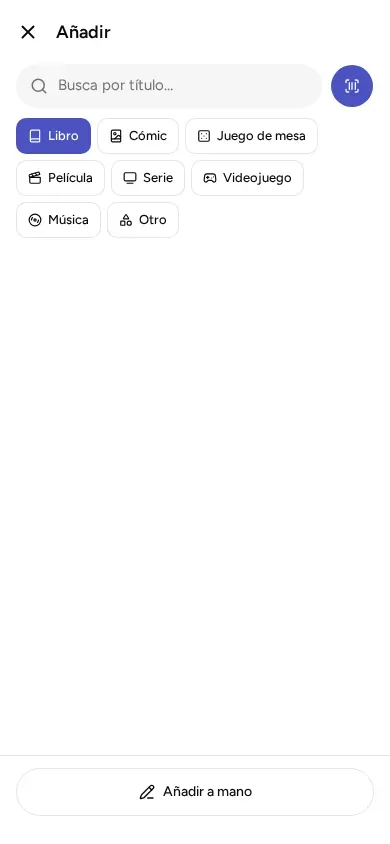
- When you add by searching for a title, you choose the kind before typing. “Book” is already selected. It is explained in Add by scanning, by ISBN or by searching for a title.
- When you add by hand, the first question is “What is it?”. If you change the kind while you fill in the details, what you have already typed stays.
- In the catalog, the row of buttons at the top (“Everything”, “Books”, “Comics”…) shows only one kind. The cover is the picture on the front. When a work has no picture, the app draws a gap in the shape of its kind: upright for a book, square for a board game or a record, and in the shape of a DVD case for a film.
What details each kind has
Section titled “What details each kind has”Every kind has a title, a year, a cover, notes, genres (what it is about) and tags (words you choose). In addition:
| Kind | Its own details | Formats of its copies |
|---|---|---|
| Book | Authorship, subtitle, publisher, language, ISBN (the number next to the barcode) | Hardcover, Paperback, Pocket, Ebook (e-book), PDF, Audiobook |
| Comic | Writer, artist, publisher, issue number, barcode | Hardcover, Paperback, Single issue (a loose comic, stapled like a pamphlet), Digital |
| Board game | Design (who created the game), publisher, players (from how many to how many), duration, minimum age, barcode | Box, Digital |
| Film | Direction (who directed it), duration, barcode | DVD, Blu-ray, 4K (the highest picture quality), Digital |
| TV series | Seasons, barcode | DVD, Blu-ray, Digital |
| Video game | Studio, barcode | Physical, Digital |
| Music | Artist, Label (the record company), barcode | Vinyl, CD, Cassette, Digital |
| Other | Barcode (optional) and the notes | Other |
Only the title is required. The rest can stay empty.
Three details change from one kind to another:
- Video games: the platform (Switch, PS5, PS4, Xbox Series, PC, or another one you type) does not go on the game’s details, but on each copy, because the same game can be on two consoles.
- TV series: each copy says which seasons you have (“Which seasons”). If you have them all, leave it empty.
- Other: has no details of its own. Anything you want to note (the maker, the reference, which is the model number, the condition…) goes in the notes.
The details of each copy (format, owner, where it is, how many copies) are explained in Copies, locations and whose each thing is.
Digital things have no shelf
Section titled “Digital things have no shelf”The digital formats are Ebook (e-book), PDF, Audiobook and “Digital”. A digital copy is not on a shelf: instead of a location, the app asks you where you have it, and it suggests services for the kind: Kindle and Kobo (e-books), Steam (PC video games) or Filmin (films online), for example. You can type whichever you want.
The genres of each kind
Section titled “The genres of each kind”Genres are a closed list that the app comes with, and it is different for each kind. On a details page you choose one or several. Below, they are shown as the app shows them. Choose the ones you need; you do not have to use them all.
- Book: Novel, Science fiction, Fantasy, Horror, Mystery & crime, Historical, Romance, Poetry, Theatre, Essay, Biography & memoir, Popular science, Children’s, Young adult, Roleplaying, Cooking, Art & photography, Travel, Other.
- Comic: Superheroes, Manga, Humor, Graphic novel, Crime, Historical, Children’s, Other.
- Board game: Strategy, Family, Party, Cooperative, Abstract, Card game, Tile placement, Worker placement, Deck building, Deduction, Wargame, Children’s, Roleplaying, Other.
- Film and TV series: Action, Adventure, Animation, Comedy, Documentary, Drama, Musical, Thriller, War, Western, and more.
- Video game: Action, Adventure, Roleplaying, Strategy, Platformer, Puzzle, Racing, Sports, Fighting, Shooter, Simulation, and more.
- Music: Rock, Pop, Jazz, Classical, Electronic, Hip hop, Folk, Flamenco, Blues, Soul & funk, Metal, Soundtrack, and more.
- Other: has no genres.
If you need something that is not on the list, use a tag: a free word that you type yourself on a work (“for trips”, “present”). You can see them and rename them in “Library settings”, “Tags”.
A genre or a tag shows you only what matches what you choose (that is called filtering). Tap the genre or the tag on the details page, or use the “Genre” and “Tag” buttons above the list.
Changing a thing’s kind
Section titled “Changing a thing’s kind”If you made a mistake, open the details page, tap “Edit” and change the “Type”. Before you change anything, the app tells you which details pass to the new kind (for example, a book’s authorship becomes writer on a comic) and which are lost. The title, year, cover and notes do not change. If a copy had a format the new kind does not have (a “Pocket” on a comic), it asks you to choose another. Until you confirm, nothing changes. To go back, tap “Keep it as…” followed by the kind it had (for example, “Keep it as Book”).
When something needs another
Section titled “When something needs another”An expansion (an add-on to a game) is no use without its base game. In “Edit”, the “Needs” field lets you note the other work. If it needs one and you do not have it, the details page warns you (“Needs …, which you don’t have.”), and the details page of the base game says “Needed by”. It can be used with any kind.
© 2026 Kosmotheka
Kosmotheka is free software: the app and the server are under the AGPL-3.0-or-later, and the operation spec is under the MIT licence. The name and the logo are not covered by the licence.
kosmotheka.com · Trademark policy · Privacy policy · info@kosmotheka.com